Streaming Planner: The Most Games From Your Adds, in Roto and H2H
FantasyEdge Team · Oct 27, 2026 · feature-explanation · 7 min read
Pick the days, your streaming slots and how many adds you will spend. The Schedule Grid's Streaming view shows which teams to hold and when to switch for the most games.
Every fantasy manager who streams asks the same question every week: which team do I pick up, and when do I swap it out? The answer is arithmetic. Count each team's games over the days you care about, try every place you could make a switch, and keep the plan with the most games. It is also the kind of arithmetic nobody does by hand on a Tuesday night, which is why most streaming is guesswork.
The Streaming view on our Schedule Grid does it for you. You choose the days, how many lineup spots you keep for streamers, and how many adds you are willing to spend. It shows the best plan for each number of adds, one below the other, so you can see exactly what one more move is worth before you make it.
How it works
A move is one add. With one move you hold a single team for the whole stretch; with two you switch once; with three, twice. If you stream in more than one slot, the moves are one budget shared between them, the way a weekly add limit works: with two slots and four moves, one slot might keep a team all week while the other switches twice.
For each number of moves, the planner cuts your days into back-to-back stretches and gives each stretch to the team with the most games in it. It is exact: every possible place to switch is tried, not a shortcut that usually lands close. A slot counts at most one game a night, and a switch drops after one night's games and adds for the next.
Teams that play exactly the same nights in a stretch are one option, because for your slot they are interchangeable: POR and SAC both playing Tuesday, Thursday and Saturday is one choice, not two. Teams with as many games on different nights are listed under it as alternatives. And when two plans tie on games, the one with more games on light nights wins. A light night is one with seven NBA games or fewer, when a daily lineup is most likely to have a spot open. Every team in a plan links to its depth chart, so you can see who actually plays before you commit an add.
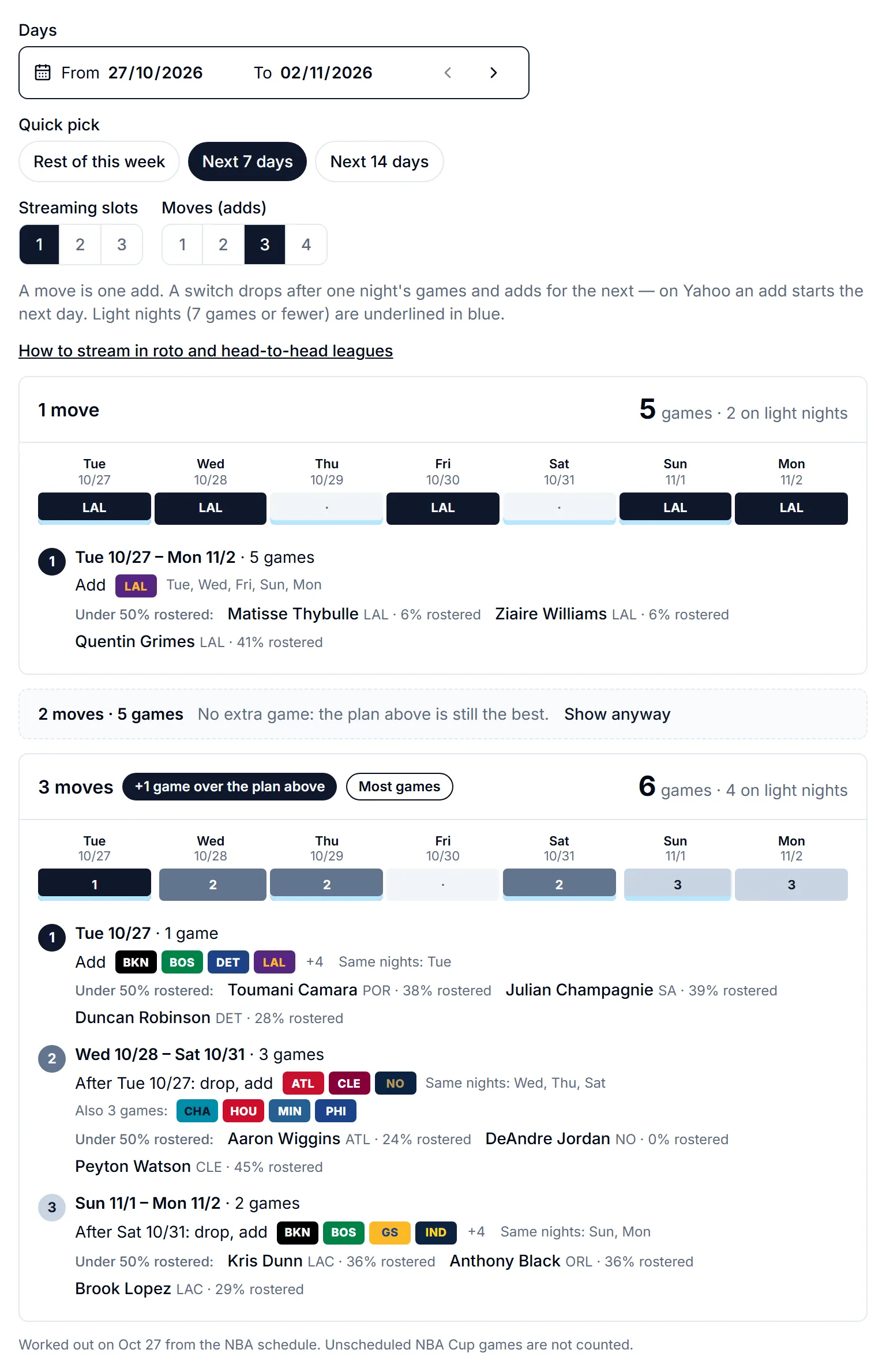
Notice the middle row. A second move this week gets you no more games than the first, so the planner folds it to a single line instead of selling you a switch that changes nothing. The third move does add a game. This happens more often than you would think: the value of a move depends on where the gaps in the schedule fall, and only trying every option shows it.
Head-to-head: win the week with volume
In a head-to-head category league, the counting categories (points, rebounds, assists, steals, blocks, threes) grow with every game your players get into your lineup. Against an evenly matched opponent, two or three extra games from one streaming slot can be the difference in several of those categories at once. That is what the planner is built for.
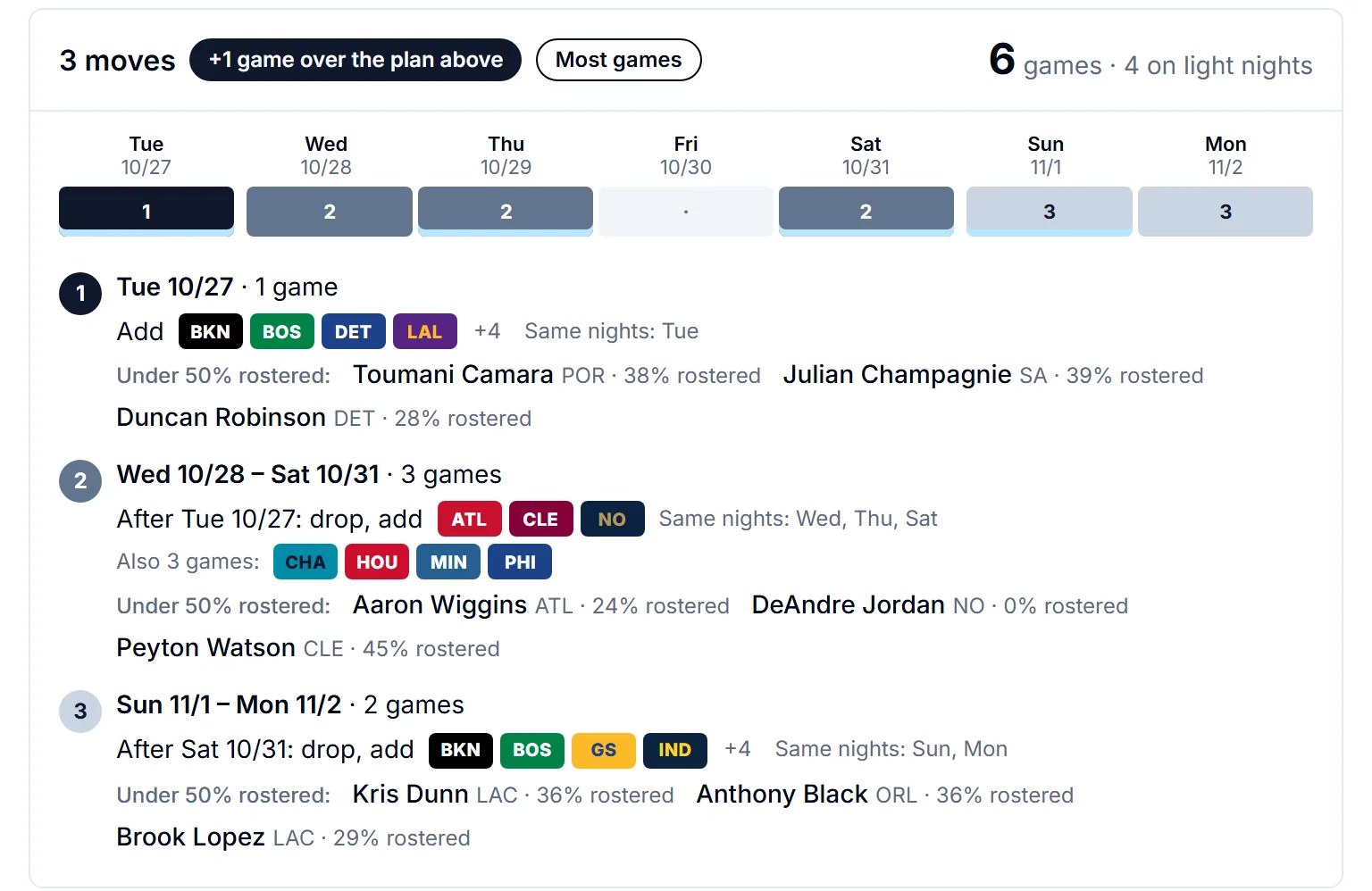
Start from your matchup week. Most leagues run their matchups Monday to Sunday, so pick Rest of this week in the planner, or set the days to your league's own week. Set the moves to what your league's weekly add limit leaves you, and read down the plans: the gain badge on each card says how many games that move buys over the one above. Spend your adds where the badge is biggest, and keep any move that buys nothing for an injury that needs covering.
Two habits make streaming pay in head-to-head. First, stream for the categories you can still win. Games add volume to the counting stats but nothing to your percentages, and a streamer who shoots poorly can cost you FG% or FT% in a week where you were narrowly ahead. If your matchup is close in a percentage category, weigh that before you add a volume shooter. The Matchup Planner shows where your matchup stands, category by category.
Second, watch the light nights. A player whose team plays on a night when your regular starters do not fills a slot that would otherwise sit empty. Games on busy nights can end up on your bench in a daily league. That is why the planner prefers light-night games when two plans tie, and why each card says how many of its games fall on light nights.
Plan your matchup in the Matchup Planner
Roto: games are the season-long edge
In a rotisserie league there is no week to win. Every category is a season-long total, so every extra game a streaming slot fills adds to your counting stats for good. Across a season, a streaming slot that averages one extra game a week adds up to a lot of points, rebounds and assists, and it moves you up in several standings at once.
Roto streaming is limited by different things, though. Many roto leagues cap games played per position, or cap transactions for the season. If your league has a games cap, streaming only helps while you are on pace to stay under it, so check your pace before you pile on. If it caps transactions, a move is worth more than in a weekly league: use the planner's longer windows, up to 14 days, and look for plans that keep a team for a long stretch instead of switching every couple of nights.
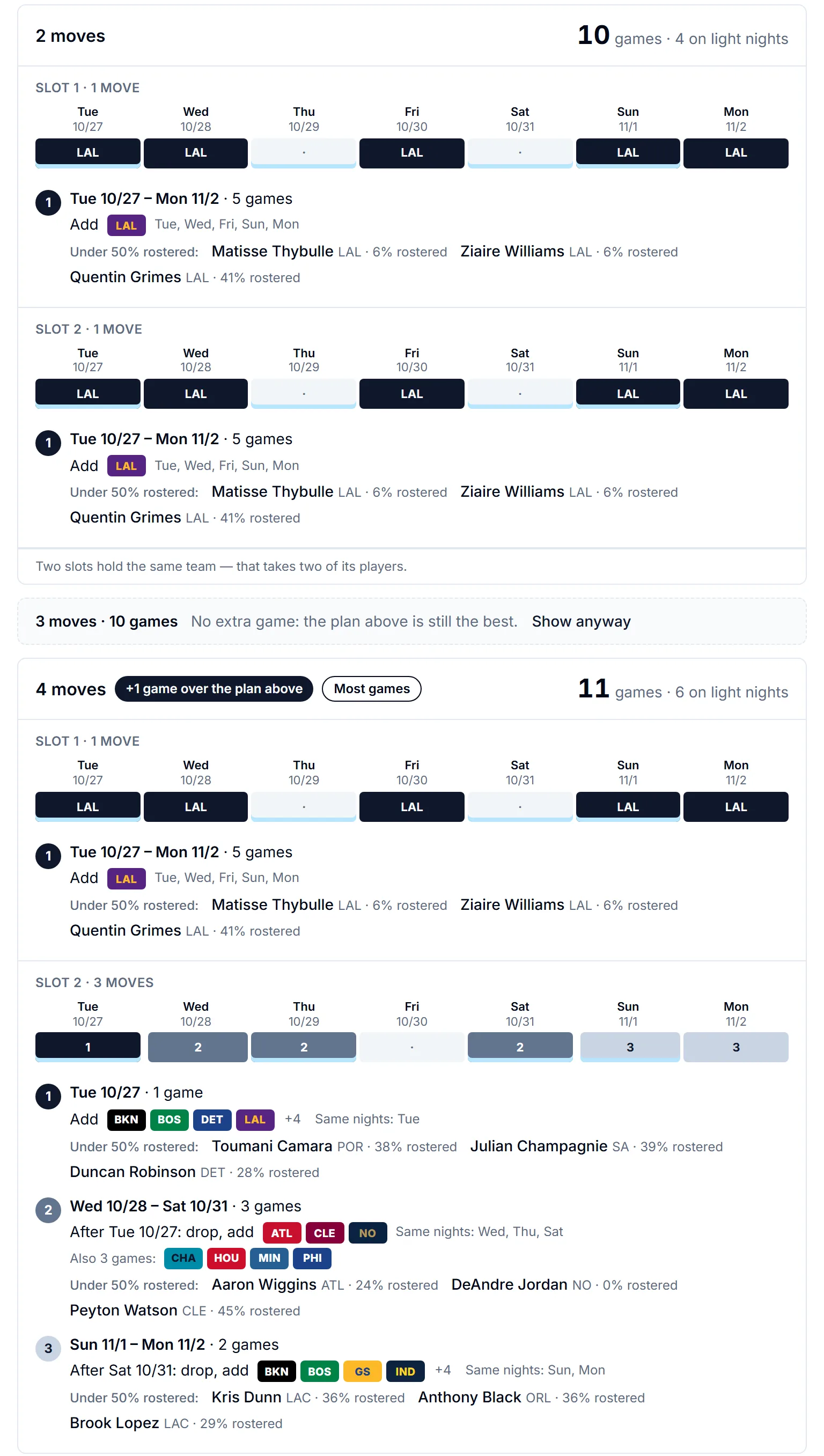
With more than one slot, the planner tries every way of splitting your moves between them. Sometimes the best answer has two slots on the same team, which means picking up two of its players; the card says so, and the pickups under the step name the players to choose from. In a deep league where a team has only one useful free agent, take the alternatives listed under each step instead.
From a team to a player
Under each step the planner suggests up to three players to pick up, each linking to his page. With your league connected they are your league's free agents on that step's teams; without one, they are players on those teams rostered in under half of ESPN leagues. Either way they are rotation players, 15 or more minutes a game, not listed out, and the best ranked first on our board. Treat them as a starting point: which one you want depends on the categories you need.
To dig further, Trending Players shows who managers are adding, and with your league connected its top pickups are your free agents; its Good schedule signal marks players likely to play most of their team's games over the next week. The Schedule Grid's By night view, switched to Players, shows each player's chance to play every night ahead. And the Injuries page tells you who is out, and who gains minutes while they sit.
Find the player on Trending Players
Good to know
The plans are worked out once a day, early in the morning Eastern time, for every window starting from today up to four weeks out, so opening the planner never makes you wait. After 7 PM Eastern it opens on tomorrow, since tonight's games may already be under way. NBA Cup games that have not been scheduled yet are not counted until they are.
Check how your platform handles adds. On ESPN a free agent you add can usually play the same day. On Yahoo an add normally takes effect the next day, so make each switch a day before the planner's first night for the new team. Waiver periods, where your league uses them, delay a pickup further.
The planner counts the games your team's schedule offers, not whether a particular player plays them. Before you add someone, check that he is healthy and playing real minutes. A five-game week means nothing if he rests two of the games.